
Scale Short-Form Content Without Rebuilding Each Edit.
Designed for content repurposing agencies and B2B marketers. Batch-process webinars and podcasts into branded vertical clips at the speed of Apple Silicon.
For content repurposing agencies, speed and brand consistency determine whether a batch is profitable. When a client hands over a webinar or podcast episode, your team needs to prepare short vertical outputs without rebuilding the same caption and brand setup every time.
Doing this manually in a heavy Non-Linear Editor (NLE) means tedious cropping, repeated style setup, and slow handoff between cleanup, captions, and export.
Velocaption gives agencies a native macOS workflow for repeatable batches:
- Portrait preparation: Queue horizontal clips and apply repeatable 9:16 framing.
- Reusable brand assets: Keep client logos, colors, text styles, and overlays ready for the next batch.
- Caption handoff: Generate local captions, review the transcript, and export subtitle files or burned-in captions.
 Velocaption’s Captions Editor applies dynamic typography and custom branding after clips are prepared for vertical output.
The Batch Repurposing Engine
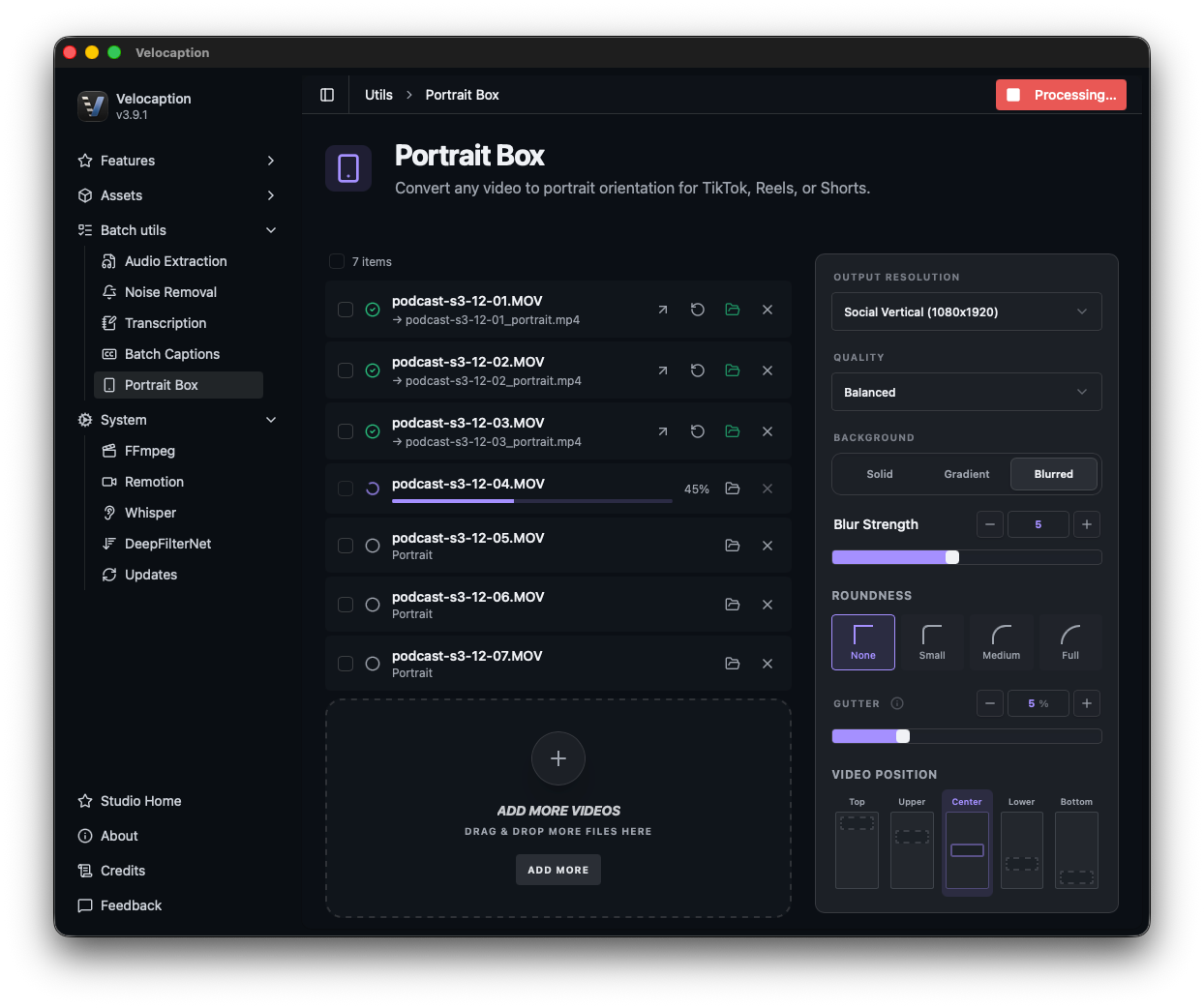
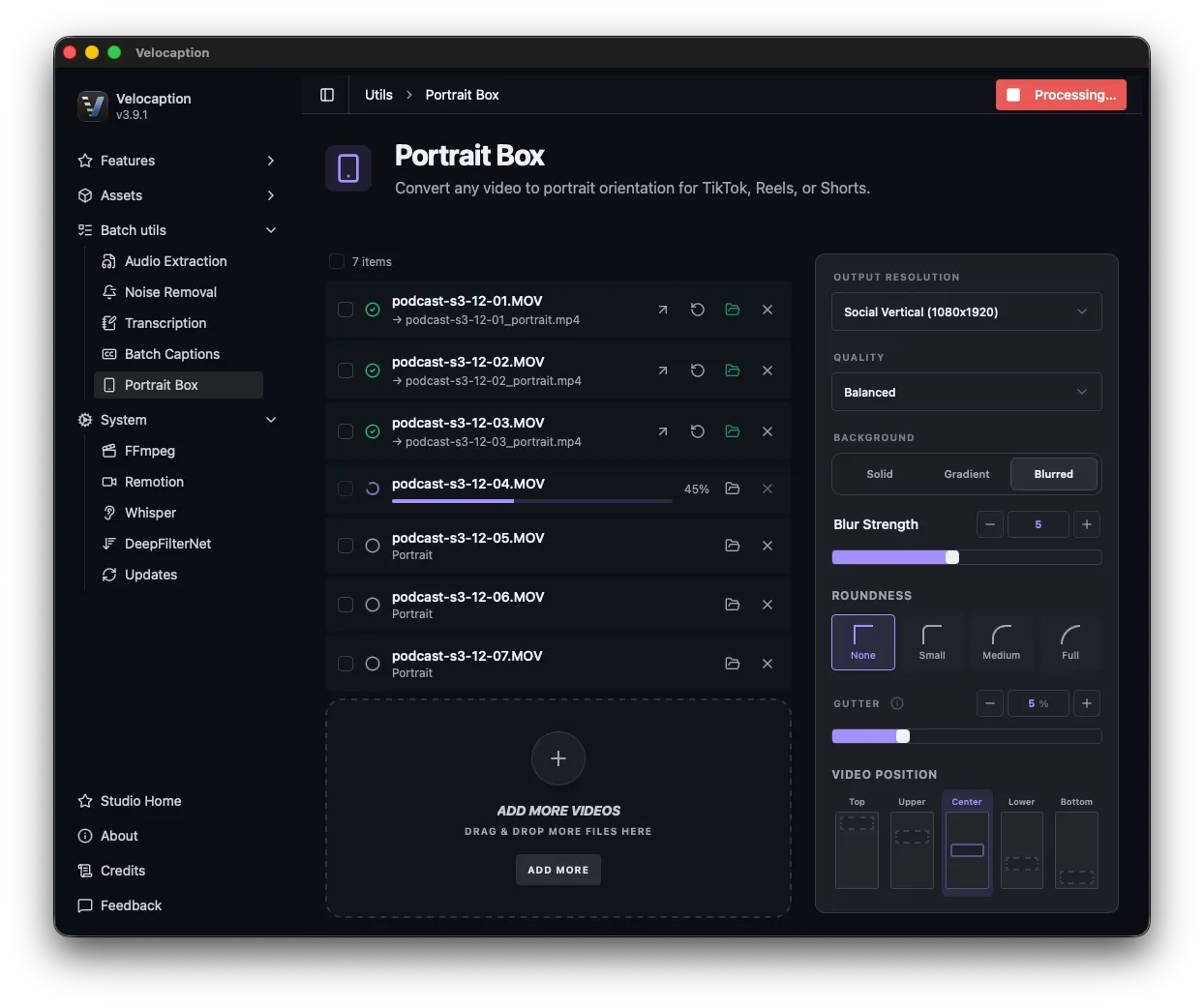
When you manage high-volume client accounts, processing one video at a time is not an option. Velocaption’s Portrait Box utility is built specifically to handle the heavy lifting of horizontal-to-vertical conversion at scale.
Drag an entire folder of 16:9 videos directly into the application. Once queued, you have granular control over the conversion:
- Precision Positioning: Choose exactly where your original footage sits within the new 9:16 vertical frame (from 1/5 top-aligned to 5/5 bottom-aligned).
- Gutters & Padding: Add subtle padding and rounded corners to create a refined, “studio-grade” aesthetic, avoiding the cheap look of edge-to-edge stretching.
- Dynamic Backgrounds: Fill the empty vertical space (the gutters) with a cinematic blur of the original footage, or apply a specific hex-code gradient to match your client’s brand identity.
Once your layout is locked in, process the queue and hand the results to cleanup, captions, or export.
Scale your agency's output today.
Get Velocaption today. €59/year or €139 lifetime. Backed by a 30-day money-back guarantee.
High-Retention Kinetic Typography
Subtitles are mandatory for mobile video, but static, boring text no longer stops the scroll. To maximize viewer retention for dense corporate or educational topics, your captions need to be dynamic.
Once your videos are vertically framed, hand them off to Velocaption’s Captions Editor:
- Local Whisper Captions: Generate captions, then review wording and timing in the transcript editor.
- Kinetic Typography: Highlight words as they are spoken, apply custom brand colors, and add animated background boxes.
- Dynamic Layouts: Use setups like Split Screen to add structure to dense monologues and tutorial clips.
Agency-Grade Brand Management
If your agency manages 50+ different client accounts, rebuilding style guides, hunting for the correct fonts, and tracking down high-res watermark logos for every new batch of clips is a massive time sink.
Velocaption is designed to be your centralized branding hub through its Global Asset Library and Text-Style Presets:
- Build it Once: Define a client’s exact visual identity: their primary typography, highlight colors, corporate background gradients, and PNG logos: and save it as a dedicated preset.
- Apply Instantly: When editing a new batch of Reels for a client, simply select their named preset from the dropdown menu.
- True WYSIWYG: The preview follows the same composition path as export, so style changes are visible before you render.
The Ultimate Engine for Agencies
Stop rebuilding the same repurposing setup from scratch. Prepare vertical clips, keep brand systems reusable, review captions, and export client-ready assets from one Mac workflow.
Scale the repeatable parts.
€59/year or €139 lifetime. 30-day money-back guarantee.
Frequently Asked Questions
Can I batch process multiple videos at once?
Yes. Our dedicated Portrait Box utility allows you to drag an entire folder of horizontal videos into the app and batch-convert them to 9:16 vertical formats automatically.
How do I manage different client brands?
Velocaption includes a Global Asset Library and reusable presets. Save text styles, gradients, and logos for each client, then apply the right set when a new batch comes in.
Does it do word-by-word 'Karaoke' text?
Yes. The Captions Editor includes kinetic typography options, allowing you to highlight words as they are spoken with custom colors and animated background boxes to maximize viewer retention.
Post faster.
Record, clean up, caption, and export from one native Mac workflow.
Related Use Cases
Local Mac Video Studio for Business Teams
Record, clean, caption, brand, and export internal business videos with Velocaption's local Mac workflow.
Video Podcast Editor for Mac
Clean long video podcasts on your Mac with silence removal, noise reduction, audio extraction, local captions, and subtitle export.