
The Portrait Box Guide
Repurpose landscape footage for vertical channels with repeatable framing, backgrounds, and handoff to cleanup or captions.
Landscape footage often needs a second life in vertical feeds, short demos, or mobile-first course material. The transition from 16:9 to 9:16 is usually repetitive work in traditional editors.
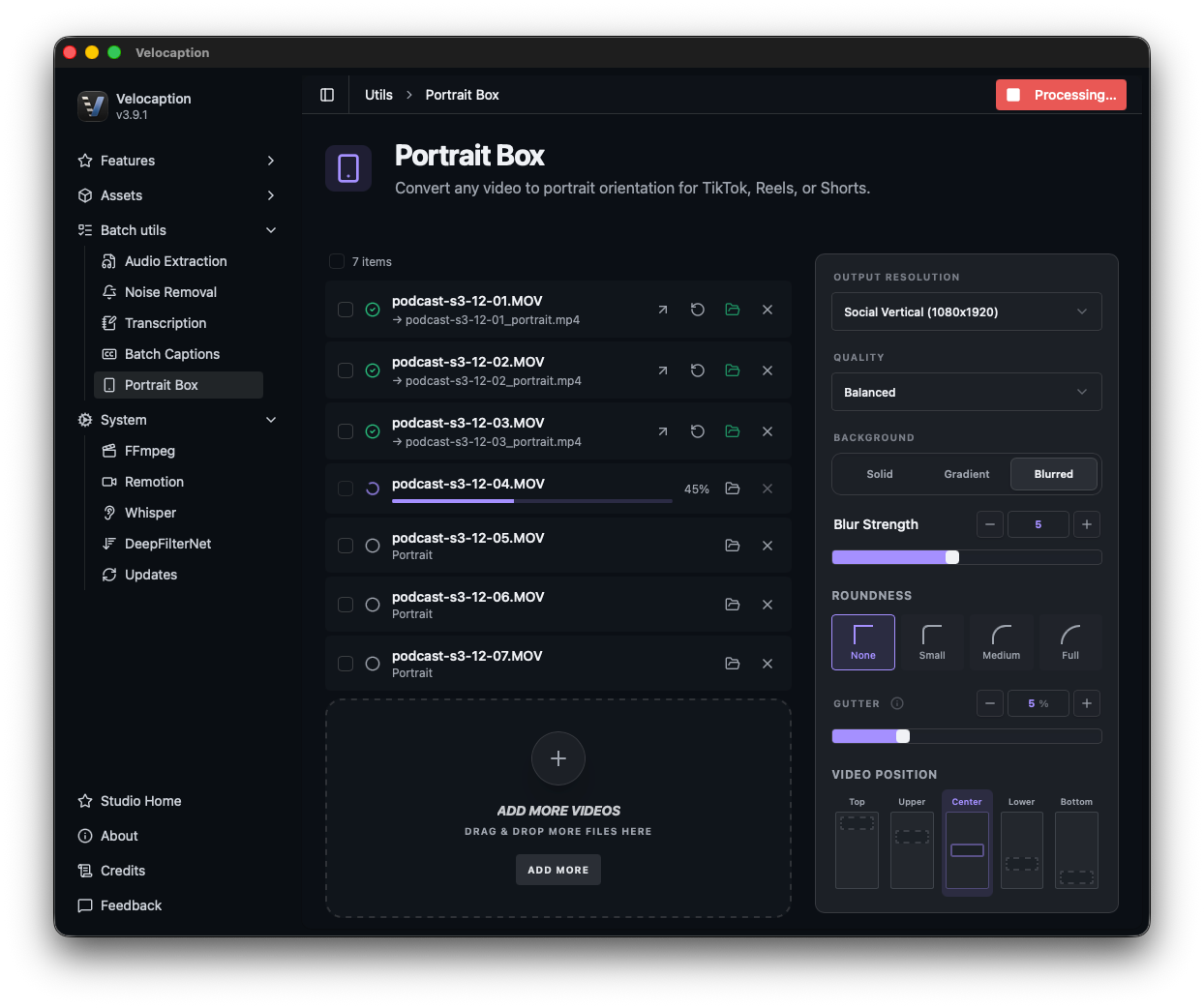
Velocaption’s Portrait Box is a dedicated utility for repeatable 9:16 layouts. It handles the frame, background, padding, and corners so each clip follows the same visual system.
1. Batch Processing for High-Volume Workflow
B2B teams and agencies rarely have just one video to convert. You might have an entire folder of training modules or a dozen client vlogs that need to be “verticalized” simultaneously.
Drag files into the app, configure the frame once, and apply the setup to a queue. Velocaption processes them sequentially, giving you a folder of portrait-ready content without rebuilding the layout by hand for every clip.
2. Precision Framing and “Gutter” Control
When you place a 16:9 video into a 9:16 frame, positioning is everything. Velocaption gives you granular control over the final look:
- Video Positioning: Choose exactly where your original footage sits in the vertical frame: from the top (1/5) to the bottom (5/5).
- Gutters & Padding: Use the Gutter slider (0-30%) to add subtle padding around your video. This creates a more refined, professional aesthetic compared to “edge-to-edge” stretching.
- Dynamic Roundness: Add optional rounded corners to your video frame to match the modern UI aesthetics of iOS and high-end mobile apps.
Prepare vertical clips without rebuilding layouts.
Get Velocaption today. €59/year or €139 lifetime. Backed by a 30-day money-back guarantee.
3. Brand-Consistent Backgrounds
What happens to the empty space above and below your video? Instead of leaving it black, Velocaption allows you to use that space for branding:
- Blurred Background: Use a blurred version of the original footage and control the blur strength.
- Solid & Gradient Colors: Use your company’s hex codes or select one of your saved Brand Gradients so the background matches the rest of the project.
4. Seamless Workflow Integration
The Portrait Box is designed to be the “entry point” for your mobile content. Once your horizontal video has been converted into a portrait box, you don’t need to hunt for the new file in your downloads folder.
Using the “Open in…” menu on any completed item, you can move your processed videos directly into our Silence Remover or Captioning tools. This allows you to go from a raw, landscape webinar to a tight, vertically-cropped, captioned clip without ever leaving the app.
Ready to dominate mobile platforms?
Stop rebuilding the same vertical frame by hand. Set the layout once, process the queue, and move directly into cleanup or captions.
Repurpose at the speed of Apple Silicon.
Get Portrait Box and the rest of the local Mac studio. €59/year or €139 lifetime. 30-day money-back guarantee.